


- Home
- Games
- Other Questions & Technical Support
- How can I turn on/off the sound effects and/or music?
How can I turn on/off the sound effects and/or music?
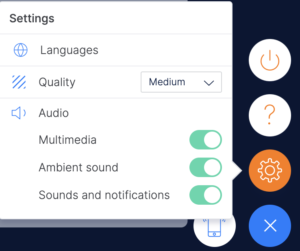
To enable or disable the game's sound effects and multimedia audio, follow these steps:
-
Click the button with three horizontal lines seen at the lower right-hand side.
-
Click on the nut-shaped button to go to Settings.
-
Enable or disable the audio as you wish:
-
Multimedia: character voices.
-
Ambient sound: background music.
-
Sound and notifications: interface audio, buttons, feedback notifications, and scores.
-
*If the sound doesn't play after turning it on in the game, please make sure it's enabled in your browser tab.