


- Home
- Campus
- Diplomas and documentation
- Sharing a diploma on LinkedIn
Sharing a diploma on LinkedIn
Now that you've completed your course, you can share your diploma on LinkedIn to let the world know about your newly acquired skills.
Prerequisites
Complete a course.
Steps
- Log into the Campus.
- Go to "My progress" in the top menu.
- Find the course you completed and click "See more."
- Click on the share icon to share your diploma on LinkedIn.
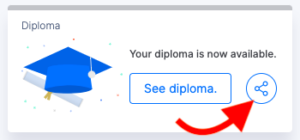
- If prompted, sign in to LinkedIn and accept the terms of service.
- Choose how you wish to share your diploma:
- As a post.
- As a private message.