


- Home
- Campus
- Access and account
- Registering on the Campus and/or in a course
Registering on the Campus and/or in a course
Registering on the Campus
You can register on the Campus via the link provided by your training or HR managers.
Prerequisites
Have the link to register on the Campus provided to you by your company.
Steps
To register, follow these steps:
- Open the link given to you by your Training department.
- Enter your email address and click "Accept" (a message will confirm that we’ve sent an email to that address).
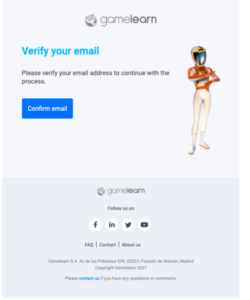
- Open the email and click on the blue "Confirm email" button to verify your email and registration.
Note: you'll have to do this when you receive the email, before the link expires. If not, you'll need to repeat the process.
- Create your account following these steps: fill in your information (password, name, and surname), choose the language in which you wish to receive notifications, and accept our Data Policy.
|
Important: once you’ve completed these steps, we’ll confirm your account creation, and you’ll be able to access the Campus. |
Registering for a course
You can register for a course through the link provided by your training or HR managers.
Prerequisites
Have the link to register for the course provided to you by your company.
Steps
To register, follow these steps:
- Open the link given to you by your Training department.
- Enter your email address and click "Accept" (a message will confirm that we’ve sent an e-mail to that address).
- Open the email and click on the blue "Confirm email" button to verify your email and registration.
Note: you'll have to do this when you receive the email, before the link expires. If not, you'll need to repeat the process.
- Create your account following these steps: fill in your information (password, name and surname), choose the language in which you wish to receive notifications, and accept our Data Policy.
|
Note: once you’ve completed these steps, we’ll confirm your account creation, and you’ll be able to access the Campus. |
|
Important: if you’ve already participated in another course with this email address, you’ll be taken directly to the Campus access page. |