


Contexts #
Context tabs allow you to filter your tasks so that you only spend time on those that can be done based on the situation you find yourself in. Each task has a particular context associated with it (home, street, office, or laptop/mobile).
To do a task, follow these steps:
- Choose the right context.
- Click the button that shows the time it takes. If the weather is red or the button is off, you won’t be able to do the task.
The calendar tells you, through color and icons, what context you’re in.
The quickest way to see the context you’re in is to look at the time box on the calendar. In the box, you’ll see the context name and icon.
|
|
3T Tasks #
3T tasks are the priority tasks for that particular day. In this case, you have to give them priority and try to complete them before the rest, which will impact your score.
To differentiate them from the rest, you’ll see the task marked with a red or orange corner both in the specific task and in the tab of each of the contexts (home, street, office, laptop/mobile, etc.). Complete them and you’ll get additional points.
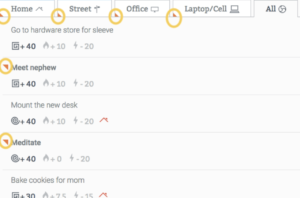
It may happen that at any given moment you’re unable to complete one of the 3Ts because you’re not in the right context. In such a case, you’ll have to wait until you are in the right context to be able to complete them.
It might also happen that you have important tasks (3T) marked on days in which you can not solve them, usually due to lack of time (very long tasks, little time available in the agenda).
As in real life, there will always be unforeseen events that will prevent us from completing all our tasks. The Triskelion system helps us greatly improve our time management, but it’s impossible for it to be perfect. The point is to get as close as possible!
|
|