


Recovering a password #
Prerequisites
Have an active account.
Steps
If you forgot your password, you can recover it from the Campus home page. To do so, follow these steps:
- Log onto the Campus.
- Enter your email and click “Forgot your password?”.
- Enter the email you registered with and click “Continue.”
|
|
Changing a password #
If you need to, you can also change or modify your password at any time from the Campus. To do so, follow these steps:
- Log onto the Campus.
- Click on your initial at the top right and click on “My profile.”
- Click on the little pencil to edit your Password.
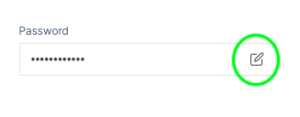
- Change your password.
- Click “Update” to save the changes.
Additional information
Remember that the password you set must contain the following:
- 8 characters
- 1 capital letter
- 1 number
- 1 special character
Please note that the password change will only take effect if you have an active account and access it through the Campus. If you are accessing from your company’s internal training platform, you must use the corresponding link.