


When delegating a task, make sure that the technique, strength, and skill requirements match the capabilities of the character to whom you are delegating the task.
To find out if a task is suitable for a character, first look at the characteristics of each of your team members, following these steps:
- Click on the character you want to delegate the task to (or any other character).
- Click on the “character data sheet” symbol at the top right.

- Check what technical, strength, and skill abilities that character has.
Next, look at the skills required for each of the tasks, following these steps:
- Click on the task you are going to delegate.
If you need it, consult the article “[Pacific] – Delegating tasks.”
- Review what technical, strengths and skill abilities the task requires, then assess the character’s abilities.
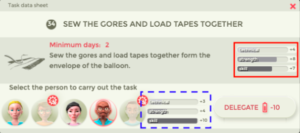
On the task card, when delegating, you should try to match the character’s capabilities (technical, strength, and skill) with the requirements of the task (technical, strength, and skill) as much as possible.
Once the task has been delegated, you cannot undo it. A lack of capability will cause the character to take longer to complete the task, and, in addition, you won’t score points.