For the correct functioning of the games, some versions of iPadOS may require the mobile version to be configured. This option is designed to adapt the game to mobile and tablet screen sizes and optimize the loading of images and resources.
To activate it, follow these steps:
-
Open Safari.
-
Click on the “ᴀA” options button in the left corner of the search bar.
-
Activate the option “Request mobile website”.
This will update the current tab to correctly display for cell phones and tablets.
You also have the possibility to use this option by default in all web pages by deactivating the desktop mode.
To disable desktop mode, follow these steps:
-
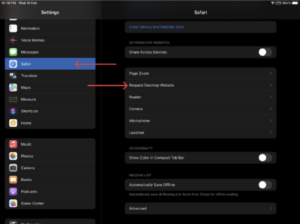
Opens the Settings window.
-
Click on “Safari”.
-
Select the option “Settings for web sites”.
-
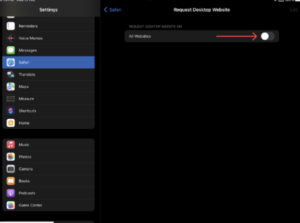
Once there, open the “Request desktop website” window.
-
Disable the “All websites” toggle button.