


Before you start playing, take a moment to familiarize yourself with the interface. Here you will find all the information and controls you need to progress through the story, manage your progress, and tailor the experience to your needs.
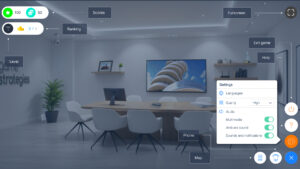
In this image, you can see all the main elements of the interface. Below, we explain what information you will find in each area and how to use it during the game.
Top left: key game information #
The top left of the screen displays the main indicators of your progress:
- Score: shows the points you have earned so far.
- Level: indicates your current level and the total number of levels available.
- Leaderboard: shows your position in the overall ranking compared to other players.
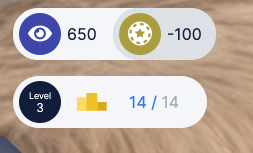
This information is automatically updated as you progress through the game.
Top right area: display #
In the top right area, you will find the fullscreen option, which allows you to expand the game to enjoy a more immersive, distraction-free experience.

You can also continue playing using the keyboard arrow keys or the ESC key when supported by the system.
Bottom right area: game management #
The bottom right area brings together most of the controls for managing your gameplay experience. From here, you can exit the game and return to the catalog whenever you need, access the virtual phone to review saved documentation, or configure the game settings.

Within the settings menu, you can customize your gameplay experience. You can change the language, select the playback quality (high, medium, or low—useful if you experience performance issues), and adjust audio options by enabling or disabling ambient sounds, notifications, or multimedia content.
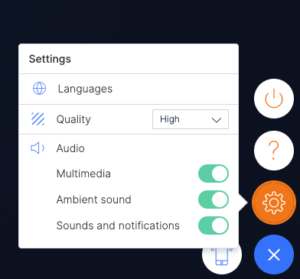
Remember that at any time you can access the help button to consult the frequently asked questions (FAQs) or request support if you have any questions or encounter any issues during the game.
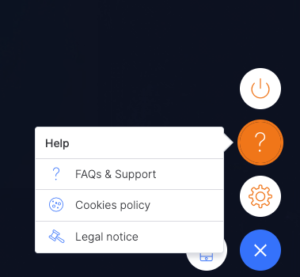
Please note that this tutorial does not apply to the following games: Triskelion, Pacific, Merchants, and 2100. For further information, please refer to the individual sections for each game: