
Skip to content
GS_LOGO_W_high - 3000
  • Games
  • Campus
  • AI Role Play
  • English
    • Français (French)
    • Español (Spanish)
Contact Support

Campus

  • Access and account
    • Customizing your Campus profile
    • Activating your account, creating a password, and accessing the games
    • Registering on the Campus and/or in a course
    • Recovering and/or changing a password
  • Leaderboards and progress
    • The Campus leaderboard
    • Viewing my progress on Campus
    • Extending your time to play
    • Learning Pathways
    • Game leaderboard
    • How the scoring works in games
  • Diplomas and documentation
    • Downloading documents and diplomas
    • Sharing a diploma on LinkedIn
  • General & Tech
    • Clear browser cache
    • Play on mobile, tablet, or iPad
    • Invite other people and earn extra points
    • Adding the Gamelearn Campus PWA to my device
    • Download and install Google Chrome
    • Favoriting courses on the Campus
    • Contacting Support from your course

Games

  • ADA
    • [ADA] How do I advance the story?
    • [ADA] – Gameplay guide and level-by-level items
  • 2100
    • [2100] – Rewards
    • [2100] – Main buttons
    • [2100] – World Map: unlock cities
    • [2100] – Office actions
    • [2100] – I don’t know how to advance. How can I continue the adventure?
    • [2100] – Lessons
    • [2100] – Sending gifts
    • [2100] – Serving customers
    • [2100] – Using the map
    • [2100] – My company’s name
  • Pacific
    • [Pacific] – Main buttons
    • [Pacific] – Menu: Screen items
    • [Pacific] – “Mind” button
    • [Pacific] – Carrying out tasks
    • [Pacific] – Group actions
    • [Pacific] – Unlock actions
    • [Pacific] – Move around the scenarios
    • [Pacific] – Percentage of construction of the balloon
    • [Pacific] – Delegate tasks
    • [Pacific] – Task tree
    • [Pacific] – Rewarding a character
    • [Pacific] – Develop a character
    • [Pacific] – Giving feedback
    • [Pacific] – Individual actions
    • [Pacific] – Choosing appropriate tasks for each character
    • [Pacific] – Increasing team motivation
    • [Pacific] – Leaderboard ranking criteria
    • [Pacific] – How scoring works
    • [Pacific] – Viewing the leaderboard
    • [Pacific] – Task order
    • [Pacific] – Choose avatar
    • [Pacific] – Virtual days
    • [Pacific] – Recharge the energy level
  • Triskelion
    • [Triskelion] – Main buttons
    • [TRISKELION] How the game works (rankings – scores – lessons)
    • [Triskelion] – Locations and Characters
    • [Triskelion] – E-mails
    • [Triskelion] – Contexts and tasks
    • [Triskelion] – I’m stuck. How do I advance the story?
    • [TRISKELION] – I cannot execute a task, how do I proceed?
  • Merchants
    • [Merchants] – Main buttons
    • [Merchants] – Negotiations
    • [Merchants] – Objective criteria
    • [Merchants] – Game structure
    • [Merchants] – Variables
  • MARS
    • [Mars] Evolution of your colony
    • [Mars] – How do I know that I have been challenged and confront one?
    • [Mars] – How do I obtain GCoins? What can I do with the GCoins that I have earned?
    • [Mars] – What is the “Happiness” in Mars and what is it for?
    • [Mars] – On what topic should I create the questions?
    • [Mars] – Who wins in a game of Mars?
    • [Mars] – Can I see another player’s map without challenging them?
    • [Mars] – How do the seasons and turns work? What is a turn and how do you overcome it?
    • [Mars] – Can I not create or answer questions?
    • [Mars] – Are there any tips or tricks to be more competitive in Mars?
    • [Mars] – What are the likes?
    • [Mars] – What can I do when I have finished my turns but I want to continue playing?
    • [Mars] – What happens if I run out of space on the map?
    • [Mars] – What are the wild cards and its purpose?
    • [Mars] – What is a challenge and who wins one?
    • [Mars] – What is the difference between debating and disputing a question?
    • [Mars] – How many resources do I obtain from each building?
    • [Mars] – Why are there some questions that give me fewer GCoins?
    • [Mars] – Why have I debated a question and not earned the money?
    • [Mars] – When is a debate resolved?
    • [Mars] – I won a building in a challenge. Where can I view it or build it?
    • [Mars] – How to play Mars?
    • [Mars] – I lost a challenge. What happens now?
    • [Mars] – What is a certified question?
    • [Mars] – How do I construct buildings? Are they built immediately?
    • [Mars] – Why should I construct buildings? When should I stop constructing them?
    • [Mars] – What is a colony?
    • [Mars] – How can I challenge a player?
    • [Mars] – I won a challenge. What happens now?
    • [Mars] – How many levels of evolution are there in the construction phase for each building?
    • [Mars] – Is there any limit to the number of challenges that I can do?
    • [Mars] – I don’t know how to advance. How do I continue the adventure?
    • [Mars] – What’s antimatter and what’s it for? How do you get more of it?
  • Kepler
    • [Kepler] – Tree
    • [Kepler] – Contamination
    • [Kepler] – Keplers
    • [Kepler] – General
    • [Kepler] – Progression
    • [Kepler] – Population
    • [Kepler] – Others
  • Other Questions & Technical Support
    • iPad: mobile version in Safari
    • How can I turn off the sound effects and/or music?
    • Solving minigames
    • Technical help advancing in the game
    • Starting over
    • Tutorial
    • Course languages
    • Catalog: complete course list
    • Consulting lessons and notes throughout the game
    • I don’t know how to advance, how do I continue the adventure?
    • Saving your session

Roleplay

  • What is this roleplay for?
    • What is this roleplay and what is it for?
    • Will this actually help me with real customers?
  • How it works and time required
    • How long does each roleplay last?
    • How do I start a simulation?
    • Do I have to follow a script, or can I improvise?
    • What ‘s my goal?
    • Can I practice as many times as I want?
  • Hands-on practice
    • What happens when the conversation ends?
View Categories
  • Inicio
  • Documentación
  • Games
  • Merchants
  • [Merchants] – Variables

[Merchants] – Variables

How to add variables to the proposal #

When you start the negotiation and move to the proposal phase, you must enter a value in the space where it indicates “Main variable”.
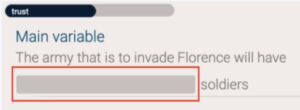
Then, you will have to write one by one the variables that come to your mind by clicking on the “Add variable” button.

If the variable you have entered is correct, the system will offer you several options to choose from and you will have to select the most appropriate for your proposal.
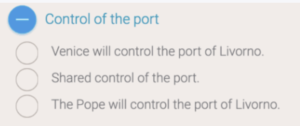
If you have any doubts, you can go back to the negotiator’s interests and concerns by clicking on the “notebook” button at the top right. If it appears blank, it means that you have not talked enough with the negotiator to discover his or her interests.

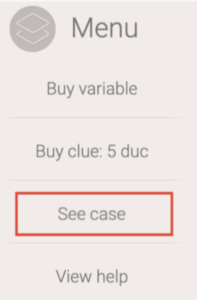
Remember that all variables can be deduced by reading the case carefully through the “Menu” – “See case” button.

How to identify variables #

As in real negotiations, there is no list indicating which variables we can bring into play.

The variables are obtained thanks to your own creativity, paying attention to the case, and making a good exchange of information with the character. That is, the more you ask, the more information you will obtain and the better you will be able to identify their interests.

You can buy a track or even variables through the “Menu” button and the “Buy hint” and “Buy variable” buttons.

What to do if no variables are found #

If you don’t manage to identify the variables in your negotiation, you can still choose to close a first deal, even if it isn’t favorable, so that you can listen to the mentor’s advice and access the hint button once you start negotiating again. You also have the “Buy hint”, “Buy variable”, and “View purchased hints” buttons to help you identify the variables you need (remember that this may penalize you).

Variables available in each negotiation #

Merchants has a thesaurus built in. You’ll need to use specific words that will help you boost your proposal. The number of variables varies depending on the negotiation. Here is a useful list to find all the necessary variables and succeed in the negotiations:

  • Negotiation number 1 (Teo Cabaldi): 3 possible variables
  • Negotiation number 2 (Daniella Babaglio): 6 possible variables
  • Negotiation number 3 (Francesco Tabari): 5 possible variables and 3 objective criteria (optional)
  • Negotiation number 4 (Marietta Robusti): 5 possible variables and 3 objective criteria (optional)
  • Negotiation number 5 (Machiavelli): 12 possible variables and 2 objective criteria (optional)
  • Negotiation number 6 (Alessandro Zorzi): 5 possible variables and 2 objective criteria (optional)

Why is it that when I enter a variable it tells me that it does not recognize it? #

Merchants has a thesaurus built in. You’ll need to use specific words that will help you boost your proposal. If the word isn’t recognized, it’s probably because it doesn’t relate to your interests or those of the other party. For example, in the first negotiation, you have several synonyms such as “loan”, “credit”, and “financing”. If you enter one of them, it will recognize the variable as it helps you to solve your economic problem. Avoid generic terms such as “sales”, “agreement”, etc.

Remember that all variables can be deduced by reading the case carefully.

[Merchants] – Game structure[Merchants] – Main buttons
Tabla de contenidos
  • How to add variables to the proposal
  • How to identify variables
  • What to do if no variables are found
  • Variables available in each negotiation
  • Why is it that when I enter a variable it tells me that it does not recognize it?

Game Strategies Support.