


How much population do I need to have to level up? #
In each level, there is a population target. To see how much population you need to get to level up, interact with the city level (top left in the interface) to open the ‘Level information’ window.
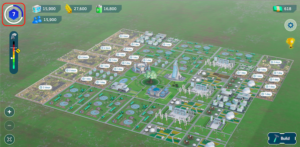
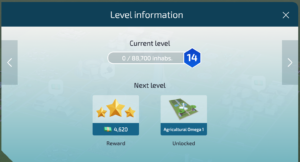
This window will show you your current population and the population target you need to reach to level up. You will also see the rewards you can earn in the next level. If you click on the side arrows, you will see the population targets for the next levels and the rewards that await you when you reach them.
How is the winner decided in the ranking if there is a tie in population? #
In the event of a tie in any of the leaderboards with respect to the current population, the tie will be broken, in order, by the following indicators:
- Contamination level: the lower the better.
- Keplers obtained by achieving work objectives: the better your performance and the more Keplers you have obtained by this means, the better. This data cannot be consulted through the game.
How can I level up? #
To level up, you need to have the population at a certain level. To do this, you need to build residential buildings that generate housing, as well as energy and agricultural buildings to supply the city. Check in detail how to increase your population here.
How often are rewards available? #
There are several rewards associated with different buildings:
- City Hall: the ‘Citizen Contribution’ reward can be collected weekly at the City Hall. Interact with the building to know the exact days remaining.
- R&D Center: as a result of its research, the R&D Center produces a reward that you can cash in on a daily basis.
- Business buildings: the reward generated by this type of building can be cashed in every day as long as the contamination is not located in the maroon or black segment.
There is also the reward based on performance relative to your weekly objectives: your company will decide how often you will be able to collect this reward. This is the biggest reward in the game. The better you do, the more Keplers you will earn.
How do I know when a new building will be available? #
To see the rewards of the next levels, access the ‘Level information’ window by interacting with the city level in the main game screen.
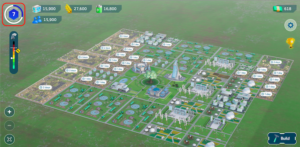
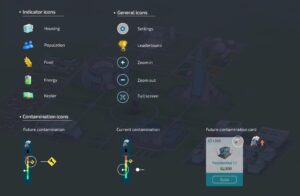
What does each icon mean? #
 #
#
How can I see the city of other players? #
On the main screen, click on the golden cup to access the leaderboard. Once inside, associated with each player in the game, you will see a ‘View city’ button.
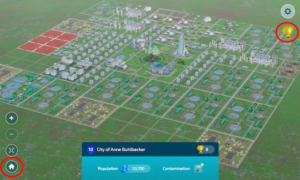
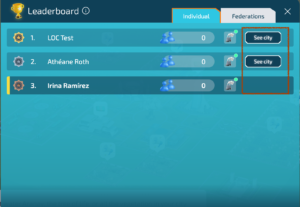
From this screen you can see the city of the other selected player. To exit, you can either go directly to your city or go back to the leaderboard by clicking on the house at the bottom left or the cup at the top right.
How can I expand my city? #
You will be able to expand your city from level 5 onwards. Go to the Town Hall and click on the ‘Expand’ button to buy the first expansion of your city.