


You will be able to view the game’s leaderboard while you are playing or after you have completed the game.
Viewing the leaderboard during the game #
To see the leaderboard during the game, follow these steps:
- Click on the menu button found at the bottom right of the screen.
- Click on the mobile phone.
- Select the option “Leaderboard”.
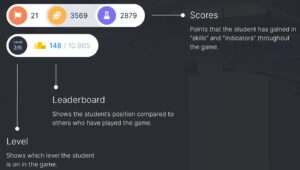
Note: you will also be able to see your rank, level and total points using the buttons at the top left. These buttons can display both the indicators (the points you earn and are related to the game or adventure) and the skills (points related to the skills, always accessible through the Mobile phone > Leaderboard menu).
Viewing the leaderboard after completing the game #
Once you finish the game, you will be able to check the leaderboard of your class on the Campus. To do so, follow these steps:
- Click on the “My Progress” tab of the Campus.
- Click “See more” on the game you want to see.
- Click on “See Leaderboard”.
If you want to know how the leaderboards are ordered and how the scoring works, check out this article.