


Requirements #
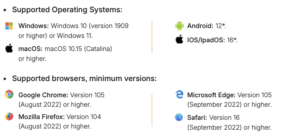
Our courses can be played on multiple devices; you can play from your mobile phone, tablet, or iPad, as long as your device meets minimum requirements.
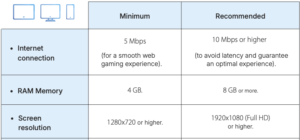
For a smoother experience, we recommend using a computer instead of a tablet or mobile, as the connection is usually more stable. However, if you want to play from a tablet or mobile, make sure the device meets these technical requirements:
Minimum requirements:
-
Android version 12 / iPad version 16 (4 GB RAM).
Recommended requirements (optimal experience):
-
Android version 12 / iPad version 16 (8 GB RAM or more).
Basic recommendations for playing from a cell phone #
- Connect from your device’s default browser (Safari for iPhone, Samsung browser for Samsung, etc.).
- On occasion, due to a slow connection or because the device receives many requests at the same time (from other applications or different screens), the game may buffer or only partially load. Try refreshing the page (to try to complete the internal processes that have stalled).
- Play with clean RAM.
- When the device has limited RAM available, the game may slow down or not load some features. Therefore, it’s possible that the same game will present loading issues for some students but not for others. The available RAM will depend on the capacity of the mobile device and its previous use.
- The process of clearing the RAM is different for each device. For example, with a Samsung, you can clear the memory from an option in “Settings” (the equivalent of clearing cache on computers).
- If, when using Chrome, a game window opens in full-screen mode and prevents you from playing, it means there is a configuration problem with the device itself. In such a case, the easiest and fastest solution is to exit full-screen mode.
- To start the games, make sure that screen rotation is enabled on your mobile device (phone or tablet). This feature is essential for correct display.
|
|
Setting full screen in Safari on iPad #
If you use Safari as the default browser on your iPad device, we recommend playing in full screen for a better experience. In that case, you will need to configure this option by going to Settings > Safari and unchecking the option: “Landscape Tab Bar”.
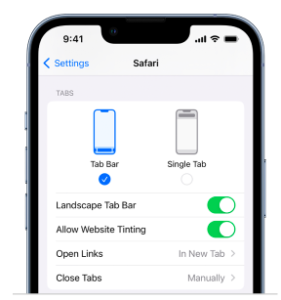
Once you deactivate this option, you will be able to play normally.