


Now that you’ve completed your course, you can share your diploma on LinkedIn to let the world know about your newly acquired skills.
Prerequisites #
Complete a course.
Steps #
- Log into the Campus.
- Go to “My progress” in the top menu.
- Find the course you completed and click “See more.”
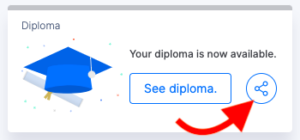
- Click on the share icon to share your diploma on LinkedIn.
- If prompted, sign in to LinkedIn and accept the terms of service.
- Choose how you wish to share your diploma:
- As a post.
- As a private message.